
Course Progress
50%
Course Progress
Free Up Space by Emptying Your Recycle Bin or Trash
It's Day 66, and today we'll learn how to empty your Recycle Bin or Trash. When you delete files, they aren't permanently removed until you empty the bin.
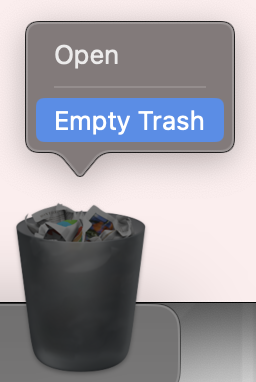
On Windows: Right-click the Recycle Bin icon on your desktop and select Empty Recycle Bin.
On Mac: Right-click the Trash icon in the dock and select Empty Trash.
Deleting files doesn't immediately free up space. They stay in the Recycle Bin or Trash until you empty it. Regularly emptying the bin ensures that deleted files are permanently removed, freeing up storage.
If you have files sitting in your Recycle Bin or Trash, empty it today to free up space on your computer.
Make it a habit to empty the Recycle Bin/Trash regularly, especially if you work with large files (like videos or photos) that can take up significant storage.
